
URL shortener system design template
Practice explaining how a short code becomes a destination URL. This editable starter diagram includes a browser, a URL service, an optional cache, and a link database. It is a drawing exercise, not a deployed URL shortening service.
By Nitin Kumar and Mayank Singh · Updated October 9, 2026
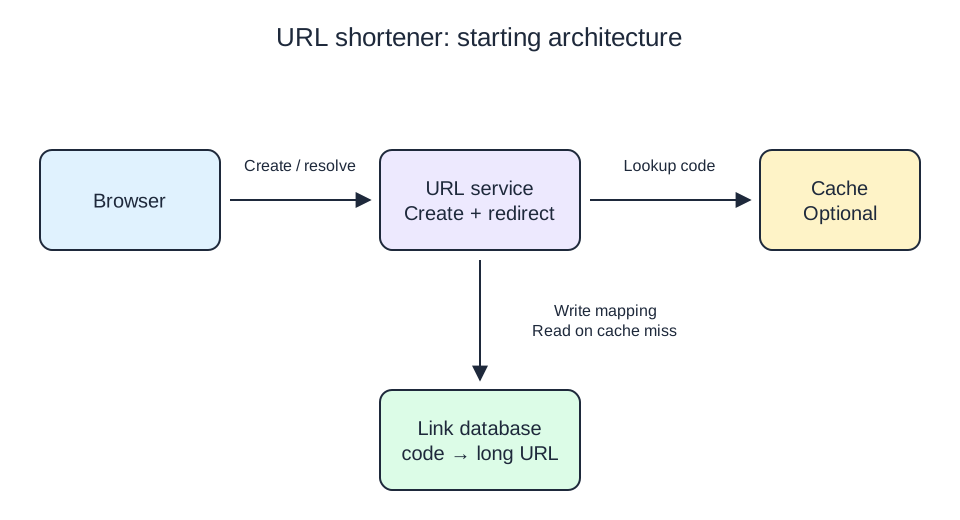
Download the editable template (.draw) · Download the SVG preview
Open and edit the template
- Download the .draw file above.
- Back up your current board as an editable file with Ctrl+S (Cmd+S on macOS) before importing another drawing.
- Open Hello Drawing and drag the downloaded file onto the canvas. Importing a scene replaces the current board.
- Edit the labels, move the components, and add your assumptions. Download a new drawing file to keep your version.
The template uses editable shapes, text, and arrows, with no account or external assets required. It can also be opened in Excalidraw. If your device cannot drag files onto the canvas, use the editor's open-file keyboard shortcut, Ctrl+O on Windows/Linux or Cmd+O on macOS.
What each component is responsible for
- Browser / client
- Creates a short link or follows one. It does not access storage directly.
- URL service
- Validates destinations, allocates codes, looks up mappings, and returns redirects or errors.
- Link database
- Stores the authoritative code-to-URL mapping and enforces unique codes. Add expiry and lifecycle fields if your requirements need them.
- Optional cache
- Stores recent lookups to reduce repeated database reads. A miss still needs the database; this box is not the source of truth.
Write path: create a short link
- The browser sends a destination URL to the URL service, for example through
POST /links. - The service validates the URL and generates a candidate short code. A random code is one option; it still needs collision handling.
- The database stores the code-to-URL mapping under a unique code constraint. A collision triggers a new candidate and retry.
- The service returns the short link after the write succeeds.
Read path: open a short link
- The browser requests a path such as
/abc123. - The service looks up the code in the optional cache. On a miss, it reads the database and may cache the result.
- For a valid mapping, the service returns an HTTP redirect with the destination in the
Locationheader. - For an unknown or expired code, the service returns an error page instead of redirecting.
A 302 Found redirect is one starting choice when the destination may change. Discuss redirect semantics and cache behavior before choosing a permanent redirect.
Make the drawing your own
Select a component to move it; the bound arrows follow. Double-click a label to rename it. Add arrow labels such as “create mapping” and “lookup code” so the two paths remain clear. To add components, place your pointer on empty canvas and type Redis or Postgres to choose a technology logo. For a generic database or load balancer, draw and label native shapes. Watch the real-canvas quick guide if you need a demonstration of drawing, component search, and exporting.
A 15-minute practice exercise
- First 3 minutes: write your assumptions for link expiry, custom aliases, and expected traffic.
- Next 5 minutes: trace one creation and one redirect. Explain when the mapping is safe to return and how a cache miss is handled.
- Next 5 minutes: annotate a collision, expired link, cache outage, and database outage. State which responses the client receives.
- Final 2 minutes: remove any unnecessary component and export your diagram with the assumptions visible.
Begin without the cache and explain when you would add it. For example, repeated reads of popular codes may benefit from caching, while every miss still reaches storage. The system design guide includes a worked load estimate and a diagram review checklist.
Decisions to discuss in an interview
- Traffic: what are the peak redirect and creation rates? Can the database handle the first version without a cache?
- Codes: how long are they, how are collisions handled, and are custom aliases allowed?
- Lifecycle: can links expire, change destination, or be deleted? How do cached copies catch up?
- Failures: what happens when cache or storage is unavailable? What must succeed before returning a new link?
- Safety: how are unsafe destinations and automated abuse addressed?
This starter omits authentication, analytics pipelines, multi-region replication, and deployment infrastructure. Add them to your drawing only when your exercise requires them. For a step-by-step approach, read how to draw a system design diagram.